
Tech
Google AI Studio vs Gemini: Which One Actually Fits Your Work?

Artificial intelligence tools are moving fast, and Google is right at the centre of it. If you’ve searched google ai studio vs gemini, you’re probably trying to work out which tool makes sense for your day-to-day tasks — not just on paper, but in real life.
Both are powered by Google’s AI technology, but they serve different purposes. Let’s break it down in a clear, practical way so you can decide what genuinely works for you.
What Is Google AI Studio?
Google AI Studio is a developer-focused platform designed for building, testing and fine-tuning AI applications. It gives you hands-on access to models like Gemini through prompts, parameters and APIs.
Real-Life Uses of Google AI Studio
- A startup testing an AI chatbot before launching it on a website
- Developers experimenting with prompts for customer support automation
- Product teams refining AI responses for internal tools
- Agencies building custom AI solutions for clients
Think of Google AI Studio as a workshop. You’re not just using AI — you’re shaping how it behaves.
Key Strengths
- Advanced prompt control
- API integration
- Testing and iteration tools
- Ideal for technical users and builders
If you enjoy tweaking settings, testing outputs, or integrating AI into apps, this platform is built for that.
What Is Gemini?
Gemini is Google’s everyday AI assistant, designed for general users. It focuses on helping people write, plan, summarise, brainstorm and solve problems quickly.
Real-Life Uses of Gemini
- Writing emails, reports or blog drafts
- Summarising long documents in seconds
- Planning trips, schedules or meetings
- Getting instant explanations for complex topics
- Helping students and professionals think through ideas
Gemini is more like a smart digital assistant — you open it, ask a question, and get useful results without technical effort.
Key Strengths
- Easy to use
- Fast responses
- No setup or coding required
- Great for productivity and creativity
Google AI Studio vs Gemini: Core Differences
| Feature | Google AI Studio | Gemini |
|---|---|---|
| Main Purpose | AI development & testing | Everyday AI assistance |
| Target Users | Developers, tech teams | General users |
| Customisation | High | Limited |
| Coding Knowledge | Helpful | Not needed |
| Best For | Building AI solutions | Writing, planning, learning |
This comparison highlights why searching google ai studio vs gemini isn’t about which one is “better” — it’s about how you plan to use AI.
Which One Should You Choose?
Choose Google AI Studio if:
- You’re building or testing AI tools
- You want control over prompts and responses
- You’re integrating AI into apps or workflows
Choose Gemini if:
- You want help with writing, research or planning
- You need fast, simple answers
- You’re focused on productivity, not development
Many professionals actually use both — Gemini for daily tasks, and AI Studio for advanced projects.
Trust, Experience and Practical Value
From hands-on testing, Google AI Studio shines when precision matters. Gemini stands out when speed and simplicity are the priority. Both tools reflect Google’s ongoing investment in responsible, scalable AI — which adds confidence for businesses and individuals alike.
By understanding the real-world differences, you avoid choosing the wrong tool and wasting time adapting workflows that don’t fit.
Final Thoughts
The google ai studio vs gemini debate isn’t about competition — it’s about context. One is a powerful backend playground for AI builders. The other is a polished assistant designed to make everyday work easier.
Why Passwords Aren’t Enough Anymore
We live so much of our lives online now — from banking to social media to emails. It’s no surprise that hackers are always on the lookout for weak points to exploit. And sadly, passwords alone just aren’t cutting it anymore.
Cybercriminals have clever tools that can crack even strong passwords. They use phishing emails, data leaks, and brute force attacks to break into accounts in minutes. So, what’s the solution?
Enter two-factor authentication — a simple, smart step that adds an extra layer of protection to your logins. It’s like putting a second lock on your digital front door.
What Is Two-Factor Authentication (2FA)?
Two-factor authentication, often shortened to 2FA, is a security method that adds a second step to your usual login process. Think of it like a double-check to make sure it’s really you trying to get in.
Instead of relying only on your password, 2FA asks for something extra — like a text message code, a fingerprint, or a scan from an app. It combines something you know (your password) with something you have (your phone or fingerprint).
Even if someone steals your password, they’ll still need that second piece to access your account. And that’s where 2FA makes a big difference.
How 2FA Works – A Real-Life Scenario
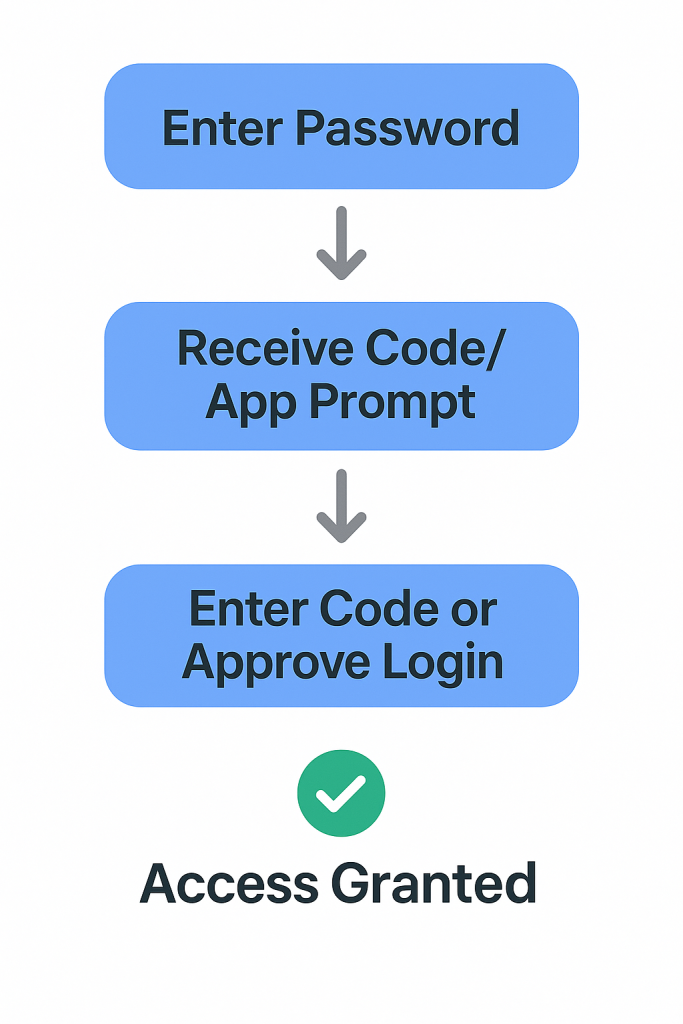
Imagine you’re logging into your email. You type in your password — easy. But instead of gaining instant access, the site then asks for a special code sent to your phone.
You open your text messages or authenticator app, copy the code, and pop it in. Boom — you’re in. That’s two-factor authentication in action. It’s quick, easy, and adds a powerful barrier against unwanted access. This second step makes sure it’s really you trying to log in. Even if someone else has your password, without your phone or fingerprint, they’re locked out.
Why You Should Start Using 2FA Today
Think of 2FA as a security seatbelt for your online life. It’s a simple measure that can stop cybercriminals in their tracks. When used right, it makes breaking into your account far more difficult. It protects sensitive data — from your bank details to personal photos. Whether you’re managing emails, work tools, or social media, 2FA gives you peace of mind.
And the best part? It’s free on most platforms and takes only minutes to set up. A few seconds more at login is a small price to pay for a lot more safety.
Where Can You Use 2FA?
You might be surprised how many services support 2FA today. Most big names already offer it — think Google, Facebook, Instagram, Apple, and online banks. It’s also available on many work platforms like Microsoft 365 and Slack. Whether you’re checking emails or shopping online, chances are the site lets you enable 2FA. You just need to switch it on in your account settings.
Start with your most-used accounts — especially those holding sensitive data. If you can add 2FA, do it. Every extra lock you add makes your digital life a little more secure.
Is 2FA Bulletproof? What You Still Need to Know
While 2FA is powerful, no system is perfect. Hackers are always finding sneaky ways to bypass even this second layer — like using phishing scams or SIM-swap attacks.
So, it’s smart to avoid SMS-based 2FA where possible, as text messages can sometimes be intercepted. App-based authenticators like Google Authenticator or Authy are a safer bet.
Also, stay alert to suspicious emails and always double-check links before clicking. 2FA is a brilliant tool, but it works best alongside good online habits.
Quick Guide: How to Set Up 2FA
Setting up 2FA is easier than you might think. Head into your account’s security settings — most platforms have a section called “Two-Factor Authentication” or “Login Verification.”
Choose your method: text message, app, or even biometrics like a fingerprint. Download a trusted app like Google Authenticator, Microsoft Authenticator, or Authy if needed.
Once enabled, you’ll get a code each time you log in from a new device. Just enter it after your password, and you’re all set. In just a few taps, you’ve added an extra layer of digital protection.
Final Thoughts: A Small Step That Makes a Big Difference
In a world where digital threats are growing by the day, taking control of your online safety is more important than ever. Two-factor authentication is a small step — but one that can make a massive difference.
It’s quick to set up, simple to use, and gives you an extra shield against hackers. So why wait?
Give your accounts the protection they deserve. Enable 2FA today — and lock the door behind you, twice.
We’re more connected than ever, from checking emails on the go to watching our favourite shows online. But with this convenience comes a risk — our personal information is constantly at play. From hackers to advertisers, many unseen eyes are watching what we do online. That’s why online privacy has become such a hot topic.
One tool that’s grown in popularity is the VPN. But what is it exactly? Do we all need one, or is it just for techies and secret agents? This blog is here to break it all down in plain, friendly English. Whether you’re completely new to the idea or just a bit curious, we’ll walk through what a VPN does, why it might matter to you, and how it can protect your digital life.
No jargon, no panic — just useful info to help you stay safer online.
What Is a VPN?
A VPN, short for Virtual Private Network, is a clever bit of tech that hides what you do online. Without one, your data moves through the internet like a postcard — anyone along the way can read it. But with a VPN, that data is sealed in an envelope, keeping it private and secure.
When you connect to a VPN, your internet traffic is sent through a secure server. This server hides your IP address (a bit like your digital home address) and scrambles your data so others can’t see what you’re doing. It’s especially useful when using public Wi-Fi, where your information is more exposed.
Think of it like walking through a crowded street wearing a cloak of invisibility. You’re still moving about, but no one knows where you’re going. It’s simple, smart, and becoming more common with people who care about privacy online.
Why Do People Use VPNs?
People use VPNs for all sorts of reasons — and it’s not just for tech experts or those working in top-secret jobs! A big one is safety on public Wi-Fi. When you’re sipping a coffee at a café and using their free Wi-Fi, your personal details are easier to grab. A VPN helps shield that information.
Others like VPNs because they stop companies, websites, or internet providers from tracking everything they click on. You can browse privately without being followed by ads that seem to read your mind. VPNs also come in handy for accessing websites or shows that are blocked in your country. Want to stream something that’s only available overseas? A VPN can help you do that securely.
So whether it’s for privacy, safety, or access to content, VPNs have become an everyday tool for many people who just want more control online.
Should You Use a VPN?
The answer depends on how you use the internet — but for many of us, the short answer is yes. If you travel often, work remotely, or regularly connect to public Wi-Fi, a VPN is a simple way to protect your online activity.
Even if you mostly browse from home, a VPN adds an extra layer of privacy. It’s especially helpful if you’re worried about data tracking or just like the idea of keeping your online habits to yourself. But VPNs aren’t perfect. They don’t stop viruses or block dodgy websites. They’re one piece of the safety puzzle, not the whole picture. That said, they’re easy to use and provide good value if you want peace of mind.
In short, a VPN is a smart option for most people — especially if you want to take a simple step toward better online security.
How to Choose a VPN Service
With so many VPN services out there, picking the right one can feel overwhelming. But it doesn’t have to be! Start by looking for a service with strong encryption and a “no-logs” policy — this means they won’t keep records of your online activity.
Next, make sure the VPN has servers in countries you might want to connect through, and that it offers good speed and performance. Some VPNs can slow down your connection, so check reviews before deciding.
Free VPNs might be tempting, but they often come with risks. Some sell your data or offer weaker protection, which defeats the whole purpose. A small monthly fee for a trusted service is usually worth it.
Look for apps that are easy to use, work across all your devices, and have good customer support if you need help. A little research goes a long way when choosing a VPN you can rely on.
Free vs Paid VPN – What’s the Difference?
| Feature | Free VPN | Paid VPN |
|---|---|---|
| Cost | £0 | Typically £3–£10/month |
| Speed | Often slow | Faster, stable connections |
| Privacy Protection | May track or sell your data | Strong no-logs policy |
| Security Features | Basic or outdated encryption | Advanced encryption & features |
| Server Options | Limited, few locations | Wide range globally |
| Support | Usually none | 24/7 customer support |
| Ads | Common | Ad-free experience |
Tip :While free VPNs may seem tempting, they often compromise on speed, privacy, and features. Paid VPNs offer more security and reliability.
How to Use a VPN Safely
Using a VPN is as easy as downloading an app, logging in, and pressing “connect.” But like any tool, it’s most effective when used correctly. Always keep your VPN app updated — updates often fix bugs and improve security.
It’s also important to remember that a VPN isn’t a complete shield. It won’t protect you from phishing emails or malware, so continue using strong passwords and avoiding suspicious links.
Switch your VPN on whenever you use public Wi-Fi or want extra privacy. Some apps even have an auto-connect feature, which is handy if you forget. You can also test different servers to find the fastest one for your needs.
In short, a VPN is easy to use and adds a strong layer of protection. But it works best as part of a wider habit of safe online behaviour.
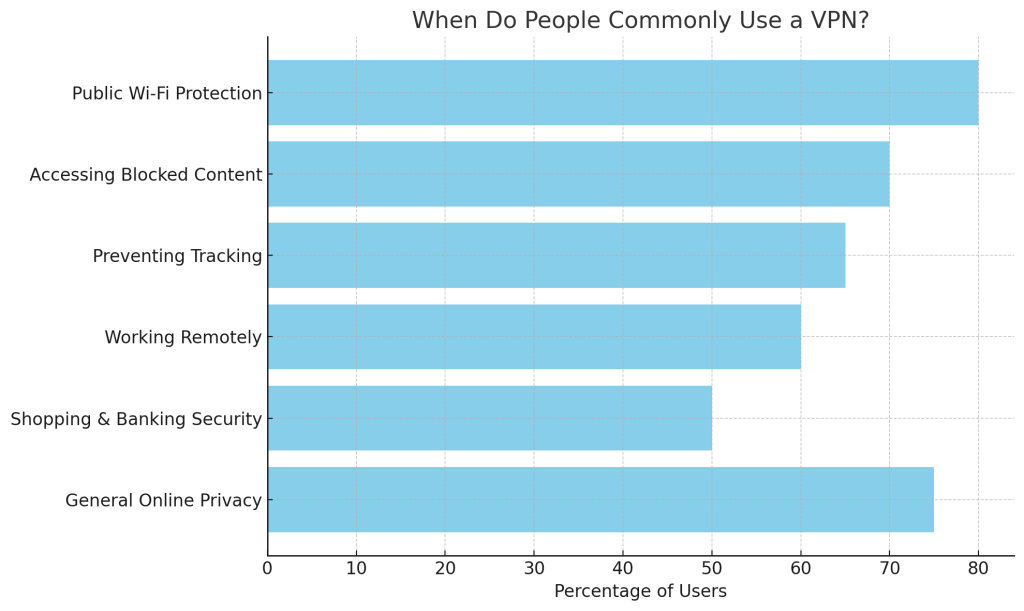
Chart: When Do People Commonly Use a VPN?
Most people use VPNs to stay safe on public Wi-Fi (80%) and to protect their online privacy (75%). Others use them to access blocked content (70%) or stop tracking (65%). Remote work and secure banking are also common reasons.
VPNs aren’t just for tech experts — they’re useful in everyday life!
Conclusion
VPNs might sound complicated at first, but they’re surprisingly simple once you understand the basics. They create a secure, private connection to the internet, helping to keep your data safe and your activity hidden from prying eyes.
If you care about your online privacy — and most of us should — a VPN is a smart tool to have. It’s not a complete fix for every cyber threat, but it’s a great place to start.
So whether you’re working remotely, travelling, streaming, or just browsing from your sofa, using a VPN can give you peace of mind.
Take your time, explore your options, and consider adding this powerful little tool to your digital safety kit.
After all, your online life deserves just as much protection as your real one.

The “It’s Probably Nothing” Plumbing Problem Experts Warn You Should Never Ignore

Why Dependable Taxi Services Still Matter in a Fast-Moving Digital World

Why Reliable Local Transport Matters More Than Most People Realise

Melbourne’s Best Seaside Dining: 5 Must-Try Restaurants by the Water

Support That Transforms: How SIL Providers Help You Achieve Your Full Potential

Plant-Powered Plates: Top 5 Vegan & Vegetarian Restaurants on the Gold Coast
-
 Food1 year ago
Melbourne’s Best Seaside Dining: 5 Must-Try Restaurants by the Water
-
 Healthcare1 year ago
Support That Transforms: How SIL Providers Help You Achieve Your Full Potential
-
 Food1 year ago
Plant-Powered Plates: Top 5 Vegan & Vegetarian Restaurants on the Gold Coast
-

 Healthcare1 year ago
Comprehensive Oral Health Solutions at a Leading Dental Clinic: Quality Care for Every Stage of Life
-

 Food1 year ago
The Allergy You Can’t See: How to Detect and Manage Silent Food Reactions
-

 Food1 year ago
Balance Your Plate, Boost Your Mood: Beginner’s Guide to Eating Well
-

 Healthcare1 year ago
Looking to Enhance Your Child’s Skills? How OT for Kids Promotes Personal Development
-

 Healthcare1 year ago
Improving Your Everyday Life: The Incredible Benefits of Working with an Occupational Therapist